 Unity Editor extension · by GetSolveIt
DevForge AI
AI game development toolkit for the Unity Editor.
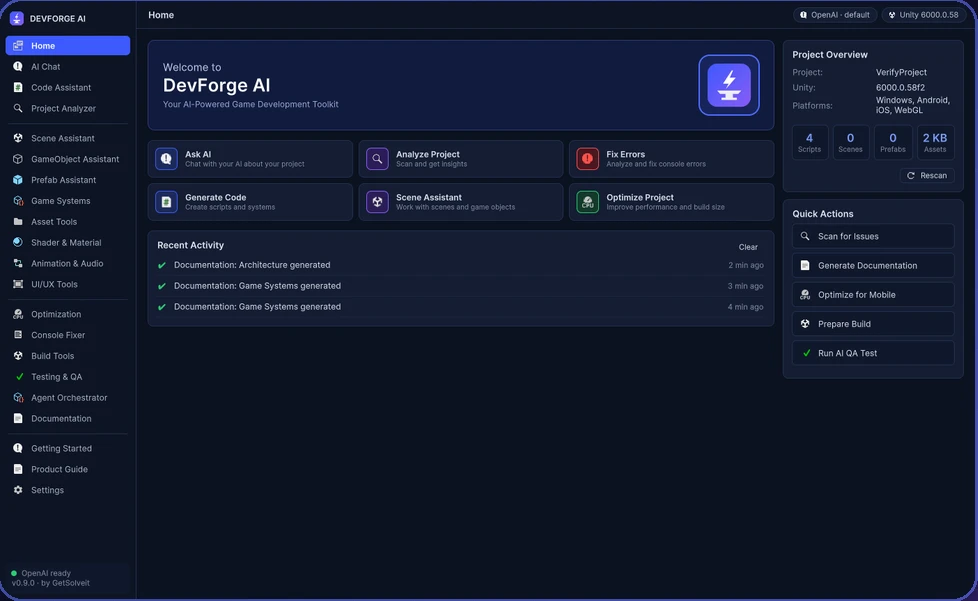
Your AI assistant, right inside Unity
DevForge AI brings AI-powered workflows into the Unity Editor. Chat about your project, generate scripts, fix console errors, optimise for mobile and generate documentation — without leaving Unity. Every change is shown to you first, so you stay in control of your project.
Everything in one Editor window
AI & Code
- AI Chat
Ask questions about your project and Unity in plain language. - Code Assistant
Generate and explain scripts and game systems. - Project Analyzer
Scan your project and get clear insights.
Scenes & Content
- Scene, GameObject & Prefab Assistants
Work with scenes, objects and prefabs faster. - Game Systems
Scaffold common gameplay systems. - Assets, Shaders & Materials
Organise assets and set up materials. - Animation, Audio & UI/UX
Helpers for animation, sound and interface work.
Quality & Build
- Console Fixer
Analyse console errors and suggest fixes. - Optimization
Find performance and build-size improvements. - Testing & QA
Run AI-assisted QA checks. - Build Tools
Prepare your project for a clean build.
Automation & Docs
- Agent Orchestrator
Coordinate multi-step AI tasks inside the Editor. - Documentation
Generate architecture and game-system documentation.
Three simple steps
Connect your AI
Use the AI account you already have. No API keys to paste into the plugin.
Ask or pick a tool
Chat, analyse the project, fix errors or run a quick action.
Review and apply
See every proposed change first, then apply only what you approve.
Compatibility
- Unity
- Unity 6 (6000.0 and newer)
- Version
- 0.9.0 (preview)
- Category
- Editor extension · AI tools
- Availability
- Coming soon to Unity Asset Store
Questions
Is DevForge AI an official Unity product?
No. DevForge AI is an independent tool made by GetSolveIt for the Unity Editor. It is not made, sponsored or endorsed by Unity Technologies.
Do I need to paste an API key?
No. DevForge AI is designed to work with the AI account you already use, so you don't have to paste API keys into the plugin.
Will it change my project without asking?
No. You review every change before it is applied to your project.
Which Unity versions are supported?
DevForge AI is built for Unity 6 (6000.0 and newer).
Where can I get it?
DevForge AI will be available on the Unity Asset Store. The link will appear on this page as soon as the listing is published.

GetSolveIt
Independent developer creating Unity Editor tools, AI workflows and automation utilities.
Unity and Unity 6 are trademarks or registered trademarks of Unity Technologies. DevForge AI is an independent product by GetSolveIt and is not affiliated with, sponsored or endorsed by Unity Technologies.